Find where your listing is losing sales.
Fix it in one paste.
A listing loses sales in two places: buyers who never find it, and buyers who find it and don't buy. ListingClimb reads your live Amazon.in listing and its page-1 rivals — keyword ranks, photos, reviews, the price band, what Rufus can answer about you — scores both leaks out of 100, and writes the fixes you paste straight into Seller Central. About two minutes. First scan free.
- Title20/20
- Bullets18/20
- Keywords22/25
- Description19/20
- Images13/15
- Main image fails Amazon's white-background check — its border measures 55 of 255, on the thumbnail shoppers click from
- Its A+ paints “HIGHEST Rated BRAND”, “India's Top pick” and three awards with no recent year — 5 lines Amazon's A+ rules don't allow
- Amazon's review summary reports cracking — a returns risk no copy can fix, so the report says what to check instead
- 4 of 5 bullets run past Amazon's 255-character limit — the rewrites fit in 143–159
Recoverable by pasting the copy fixes: Bullets +2 · Keywords +3 · Description +1
A scoring measurement, not a sales prediction.
How an Amazon.in listing makes sales — and where yours leaks
Amazon sales come down to two numbers: how many buyers find you, and how many of those choose you. Four levers move them. Here is what the scan checks on each, and what you get back.
- 01
Found
Rank for what buyers actually type.
We check: Your live organic rank for each keyword (ads counted separately), the category phrases your listing is missing, and your backend search terms.
You get: Title, bullets and the backend string rewritten with the missing phrases as exact terms.
- 02
Clicked
Win the click on the results page.
We check: The four things a buyer sees in search: main image against Amazon's policy, measured from the pixels; the title against Amazon.in's 75-character rule; price and rating count against the band shoppers compare in.
You get: The policy fix named, and a title within 75 characters with its Item Highlights, ready to paste.
- 03
Chosen
Turn the visit into the order.
We check: Every bullet for filler versus benefit, the shot types your gallery lacks, whether your description feeds search and Rufus, and every claim against your own listing.
You get: Five bullets, a spec-complete description, and the shots to add.
- 04
Kept
Fewer returns, better reviews, higher rank.
We check: The objections in your real reviews, split into ones copy can answer and ones it can't, and the praise buyers volunteer unprompted.
You get: A line for the bullets that answers the objection, the praise themes to lead with — and product-level issues named, not written around.
We don't promise a sales number. Price, stock, ads and reviews move sales too, and no tool outside your seller account can see them.
We do promise a measured lift. The report tells you how many of your missing points are recoverable, section by section. Paste the fixes, re-scan, and the lift is measured — with the report saying what came from your edits and what from the market.
What a listing optimization report looks like
The tool's own report for a category leader — the SOLARA cast iron tawa, 12 inch (ASIN B0CLPB7CTY, organic #1 for “cast iron tawa”, with 3,746 ratings at scan time). Excerpted, with the wording edited for clarity; every number, rank, verdict, photo and buyer quote is exactly what the scan produced.
Your bullets break Amazon.in's listing rules — your sales plan says how to fix them
- 2 searches checked live on Amazon.in
- 9 photos read · main image measured
- 8 reviews read → 3 objections
- 40 page-1 rivals priced and rated
Interactive — tap any tab to see that part of the report

- Nobackground not pure white — measured: the border averages 55 of 255; Amazon needs 255
- Yesno added overlays
- Partlyproduct may fill ~65% of the frame (a model estimate, not measured this scan — not counted against you); Amazon asks for 85%+
Vibrant lifestyle shot showing dosa preparation. This composition risks suppression.
Printed on the product itself, which is fine: “SOLARA”.
Native size 2000 × 2000 px (measured) — zoom-ready.
 1Lifestyleworth improving
 2Lifestyledoing its job
 3Infographicdoing its job
 4Infographicdoing its job
 5Lifestyledoing its job
 6Infographicdoing its job
 7Infographicdoing its job
 8Scaledoing its job
 9Trustdoing its job
Worth checking first — the AI image reader's view alone, so look at the image yourself before changing it: Insert a before/after or side-by-side comparison image showing the tawa's seasoning progression (new vs. well-used) to support the 'gets better with time' messaging in image 2.
- Feature close-upA macro shot of the detail your copy leads with — the part a buyer would inspect in person.For your listing: Add a close-up detail shot showing the pre-seasoned surface texture and finish to reinforce the 'non-stick & chemicals free' claim and differentiate from raw cast iron.

Clear feature callouts (Easy Grab Handles, Quick to Heat, Non-stick & Chemicals Free, Heavy Base, care instructions) with readable text and logical layout.

Stove-compatibility grid (Halogen, Induction, Gas, Electric) is clear and directly addresses a buyer concern; the egg-cooking demo reinforces the non-stick claim.

Dimension overlay (Length 36 CM, Width 30 CM, Height 1 CM, Weight 3.1 kg) is precise and clearly labelled; matches the title's 12 inch / 30 CM.

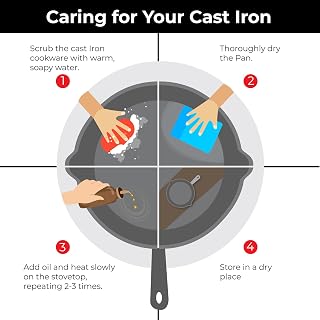
Care instructions (wash with warm soapy water, dry thoroughly, oil and heat slowly 2–3 times, store dry) are practical and reduce post-purchase confusion.
All 9 photos shown; 4 of the 8 “doing its job” notes excerpted — the full report has a note on every photo.
This is an excerpt. The full report carries every bullet, keyword, review theme, photo verdict and rival — for your listing, one free scan away.
How the Amazon.in listing scan works
Three steps, and you stay in control of every change.
Paste your ASIN or Amazon.in link
Sign in with Google — no password to remember. ListingClimb only needs what any shopper can see: never your Seller Central login, and it can't change anything on your account.
We read Amazon live — about two minutes
Your listing page, page-1 results for your keywords, your photos and your reviews. The scoring runs, then the rewrites are written and checked against your listing's own facts before you see them.
Paste the fixes. Re-scan to verify.
Copy the title, bullets, description and backend terms into Seller Central. Your next scan says whether the score moved because of your edits or because the market shifted under you.
Honest by design. If a check can't run — Amazon blocks a fetch, a photo won't load — the report says which points went unmeasured. Nothing is filled in with a guess, and a failed scan doesn't cost a credit.
Why not ChatGPT, or a ₹12,000-a-month suite?
Three ways to work on a listing yourself. Here is what each actually costs an Amazon.in seller, and what you get for it.
First scan free₹75 each in the 20-pack.
Pay in rupees by UPI or card, only when a listing needs work. No subscription, and credits never expire.
Google AI Pro ₹1,950. The free tiers cap your messages and drop to smaller models.
And no tier, paid or free, can see Amazon's live search results, your photos or your reviews. It only knows what you paste in.
$129, or $99 billed yearly ≈ ₹1,14,000 a year. Jungle Scout $29–129 a month.
Priced in dollars, built around Amazon.com. Jungle Scout lists India as "partially compatible"; Helium 10 support varies tool by tool.
One month of Helium 10 = about 80 ListingClimb scans. Its ₹12,300 monthly fee pays for 80 scans at ₹149, or 160 with the 20-pack — enough to scan, fix and re-scan every listing most Amazon.in sellers have, several times over.
Or hire an agency: ₹5,000–15,000 per listing, days to weeks of waiting, and a report you can't verify. The same ₹5,000 buys 33 ListingClimb scans — each about two minutes, with every rank, price and rating checkable on Amazon.in yourself.
| What matters | ListingClimb one scan, pay per scan | ChatGPT / Gemini a chatbot and your own research | Subscription suites Helium 10, Jungle Scout and the like |
|---|---|---|---|
| Built for whom | YesBuilt in India for Amazon.in sellers, and nothing else: rupee price bands, Amazon.in page-1 results, Rufus as Indian shoppers see it, rupee pricing by UPI. | NoEveryone in general, no seller in particular. It knows nothing about your category on Amazon.in today. | PartlyUS sellers first: dollar pricing, tools built around Amazon.com. India is one marketplace among 24, with support that varies tool by tool. |
| Live Amazon.in data | YesReads your listing and 40 page-1 rivals at scan time: live organic rank with ads counted separately, prices, ratings and sales badges. | NoNone. It cannot run an Amazon search for your ASIN, so it cannot tell you where you rank or who beats you. | PartlyKeyword databases and rank trackers you set up yourself, keyword by keyword; the deeper data sits on the higher plans. |
| Your photos and reviews | YesEvery photo graded and the main image measured against Amazon's policy from the pixels; reviews mined for objections and the praise to lead with. | NoOnly what you upload or paste, and no measurement against Amazon's rules. | PartlyKeyword and copy tools; photos and reviews stay your job. |
| Rewrites you can paste | YesTitle, five bullets, description and backend terms — each checked against your own listing. A claim it can't support is struck, not invented. | NoFluent, and happy to invent a feature your product doesn't have. Every line needs checking. | PartlyAn AI writer on the paid plans; you verify every claim yourself. |
| Proof it worked | YesRe-scan after pasting and the lift is measured, with the report saying what came from your edits and what from the market. | NoNo score, no memory of your listing, nothing to measure against. | PartlyRank trackers show movement over time; reading it is up to you. |
| Time to a full report | YesAbout two minutes, with a PDF. | PartlyHours of prompting and research per listing. | PartlyDays to learn the suite, then ongoing work. |
Built for whom
- YesListingClimbBuilt in India for Amazon.in sellers, and nothing else: rupee price bands, Amazon.in page-1 results, Rufus as Indian shoppers see it, rupee pricing by UPI.
- NoChatGPT / GeminiEveryone in general, no seller in particular. It knows nothing about your category on Amazon.in today.
- PartlySubscription suitesUS sellers first: dollar pricing, tools built around Amazon.com. India is one marketplace among 24, with support that varies tool by tool.
One listing, all seven checks, in about two minutes. No card, no subscription.
Prices checked 12 September 2026 on each provider's own pricing page, at $1 ≈ ₹95.7. Suite features vary by plan.
Amazon listing optimization pricing — pay per scan
One scan = one complete report for one listing — all seven checks, every rewrite, the PDF. Your first is free. After that, buy a few scans at a time, from ₹149 down to ₹75 each, and use them whenever you like. No subscription; credits never expire.
How many scans does one listing need?
Two or three. That is why the packs are sized the way they are.
- ScanThe report: score, leaks, paste-ready fixes.
- Paste the fixesInto Seller Central — no scan needed for this.
- Re-scan to measureSame listing, a week later: what moved, and why.
No card. Sign in with Google, paste your ASIN, and it runs.
For a re-check after your fixes go live
Done right: scan, fix, then verify the lift
Scan, fix and verify 2 listings properly
Best per-scan rate. For 10+ ASINs.
- All seven checks
- Title rewrite
- Five bullet rewrites
- Description rewrite
- Backend search terms
- Live keyword ranks
- Photo audit
- PDF report
Helium 10's cheapest plan is $99–129 a month — around ₹9,500–12,300, every month. Twenty ListingClimb scans are ₹1,499, once, and they never expire.
A note from the founder
I built ListingClimb because a good listing shouldn't cost an Indian seller ₹12,000 a month — or a consultant's retainer.
The serious listing tools are built in the US, priced in dollars and sold to sellers doing lakhs a month — Helium 10's cheapest plan is ₹12,300 every month, for a suite built around Amazon.com where India is one marketplace among 24. ChatGPT and Gemini can't open Amazon.in — they only know what you paste in, and guess the rest. And an agency is ₹5,000–15,000 per listing, days to weeks of waiting, and a report you can't verify.
Most Amazon.in sellers have a handful of listings, not five hundred — and every one of them is a shop you built yourself, often against bigger brands with agencies on retainer. You don't need forty tools. You need one honest read of one listing: where it is leaking sales, exactly what to paste, and whether it worked. ListingClimb is that one read — an Amazon.in listing optimizer built in India for Amazon.in sellers and nothing else. One scan reads your listing live and grades it across seven checks — title, bullets, keywords, description, reviews, images and market — with a paste-ready fix on each. It checks its own rewrites against your listing's facts, and charges per scan, in rupees, because that is how a small business actually spends: ₹149 when a listing needs work, the first one free.
It's new, and this page has no testimonials because I'd rather earn real ones than write fake ones. Run the free scan. If the report doesn't tell you something specific and true about your listing, write to me — I read every message at support@listingclimb.com.
- YesFirst scan free, full report — no card needed.
- YesEvery pack has a 7-day, no-questions-asked refund.
- YesSupport answered by the person who built it, within a business day.
Common questions about Amazon listing optimization
Find the leak. Paste the fix.
In about two minutes, free.
Paste your ASIN, sign in, and the report is on its way. No card, no subscription, no Seller Central access.